Wedding Silhouette Vector Bundle: 21 Designs for Crafting
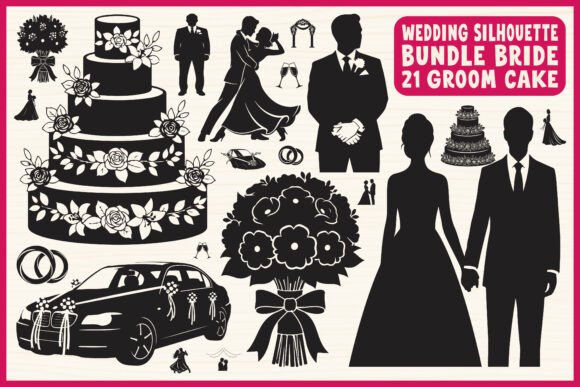
When a client asks for "elegant but not fussy" wedding stationery, I often find myself reaching for high-quality silhouette graphics. There is a timeless quality to a black cutout against a white or textured background that conveys romance without relying on trendy gradients or complex illustrations. The Wedding Silhouette Vector Bundle is a perfect example of this aesthetic done right. It isn’t just a collection of images; it is a toolkit of 21 distinct elements that cover the entire narrative of a wedding day, from the nervous anticipation to the final drive away in a vintage car.
The Aesthetic of the Wedding Silhouette Vector Bundle
Visual consistency is the backbone of good brand identity, and that applies to personal events like weddings just as much as corporate logos. The Wedding Silhouette Vector Bundle offers a cohesive visual language. The style relies on clean, solid black shapes—what we in the design world call "spot color" application. This simplicity is its superpower. You have the bride and groom, of course, but also the supporting cast: the tiered cake, the floral bouquet, the rings, and various romantic couple poses.
Unlike a script font or a handwritten font which can sometimes struggle with legibility at small sizes, these silhouettes maintain their integrity whether they are blown up to fill a backdrop or shrunk down to the size of a packaging design sticker. The appeal lies in the high contrast. In editorial design, we call this "visual weight." These assets have enough weight to anchor a layout without overpowering the typography you choose to pair with them.
Practical Applications: From Logo Design to Social Media Graphics
If you are a small business owner or a crafter, the utility of the Wedding Silhouette Vector Bundle extends far beyond a single project. For those using Cricut or Silhouette Cameo machines, the inclusion of SVG files is non-negotiable. These files allow the cutting machine to read the vector paths precisely, ensuring your blade cuts sharp corners on that wedding car or the intricate loops of the rings.
Here is how different professionals can leverage these assets:
- Wedding Invitations: Use a large, faint silhouette as a watermark behind the text, or a sharp black icon at the top for a formal look.
- Event Decorations: Laser-cutting these designs onto acrylic signs or cake toppers is a popular trend. The EPS and SVG formats ensure the lines remain smooth during the engraving process.
- T-Shirts and Merchandise: For bachelorette parties or bridal showers, these vectors work perfectly for screen printing or heat transfer vinyl. The transparent PNG files are ready to drop onto a mockup immediately.
- Web Design: If you are a wedding blogger, using these silhouettes as background elements or list icons can unify your site's look, creating a recognizable brand identity that readers trust.
Think of these vectors as a premium font for imagery. Just as you wouldn't use a display font for body text, you use these silhouettes for impact. They serve as the headline visual, drawing the eye in social media graphics or on the cover of a wedding program.
Integrating Vectors with Modern Typography
A silhouette is only as good as the typography that accompanies it. One of the strengths of the Wedding Silhouette Vector Bundle is that its neutrality makes it a perfect partner for various font styles. Because the graphics are black and white, they don't clash with your color palette.
If you are aiming for a classic, formal wedding aesthetic, pair these silhouettes with a serif font. The small details in the serif letters mimic the elegance of the bride's veil or the groom's lapel. Conversely, if the wedding theme is modern and minimalist, a clean sans serif font creates a striking contrast against the organic shapes of the floral bouquet vectors.
I have seen creators use these assets to create monograms. By overlapping a letter from a creative font with a ring silhouette, you create a unique mark that feels professional. This is a technique often used in high-end logo design, but with this bundle, a hobbyist can achieve the same result in minutes.
Technical Specifications and File Utility
Understanding the file formats included in the Wedding Silhouette Vector Bundle is key to getting your money's worth. You aren't just getting pictures; you are getting scalable architecture.
- EPS (Editable Vector): This is the industry standard for professional designers using Adobe Illustrator. It allows you to manipulate the anchor points of the design.
- SVG (Cricut & Cutting Machine Ready): This is the magic format for makers. It keeps the file size small but the quality infinite.
- PNG (Transparent Background): Essential for quick mockups or layering images in software like Canva or Photoshop without worrying about white boxes around your graphics.
- JPG (High Resolution): Good for printing or sending to clients for approval when they don't have design software.
This versatility makes the bundle a "set it and forget it" asset. You buy it once, and it serves you through the save-the-dates, the wedding day, and the thank-you cards. For commercial use, this is a significant advantage. If you are a print-on-demand seller, you can legally use these designs to create products for sale, provided you adhere to the license terms.
Choosing the Right Design for Your Project
With 21 designs, you have options, but choice paralysis is real. My advice is to look at the "negative space" of your layout. If you have a lot of text on your invitation, choose a simpler silhouette, like the rings or a single sprig of flowers. If you have a lot of open white space, you can afford to use the more detailed "romantic couple poses" or the "vintage wedding car."
Also, consider the medium. If you are doing laser cutting on wood, highly detailed floral vectors might burn poorly or break. In that case, the bolder, thicker shapes—like the wedding cake—are safer bets. If you are screen printing on t-shirts, the solid black nature of the Wedding Silhouette Vector Bundle is ideal because it blocks the fabric color completely, ensuring high opacity.
Ultimately, this bundle is about removing friction from the creative process. Instead of spending hours trying to draw a bride that looks anatomically correct, or tracing a photo to make a vector, you have a library of ready-to-use art. It allows you to focus on the layout, the color palette, and the message—the things that truly make a wedding design personal and memorable.